> ## Documentation Index
> Fetch the complete documentation index at: https://docs.tempo.new/llms.txt
> Use this file to discover all available pages before exploring further.
# Organizations & Workspaces
> How Tempo nests orgs, projects, workspaces, and worktrees.
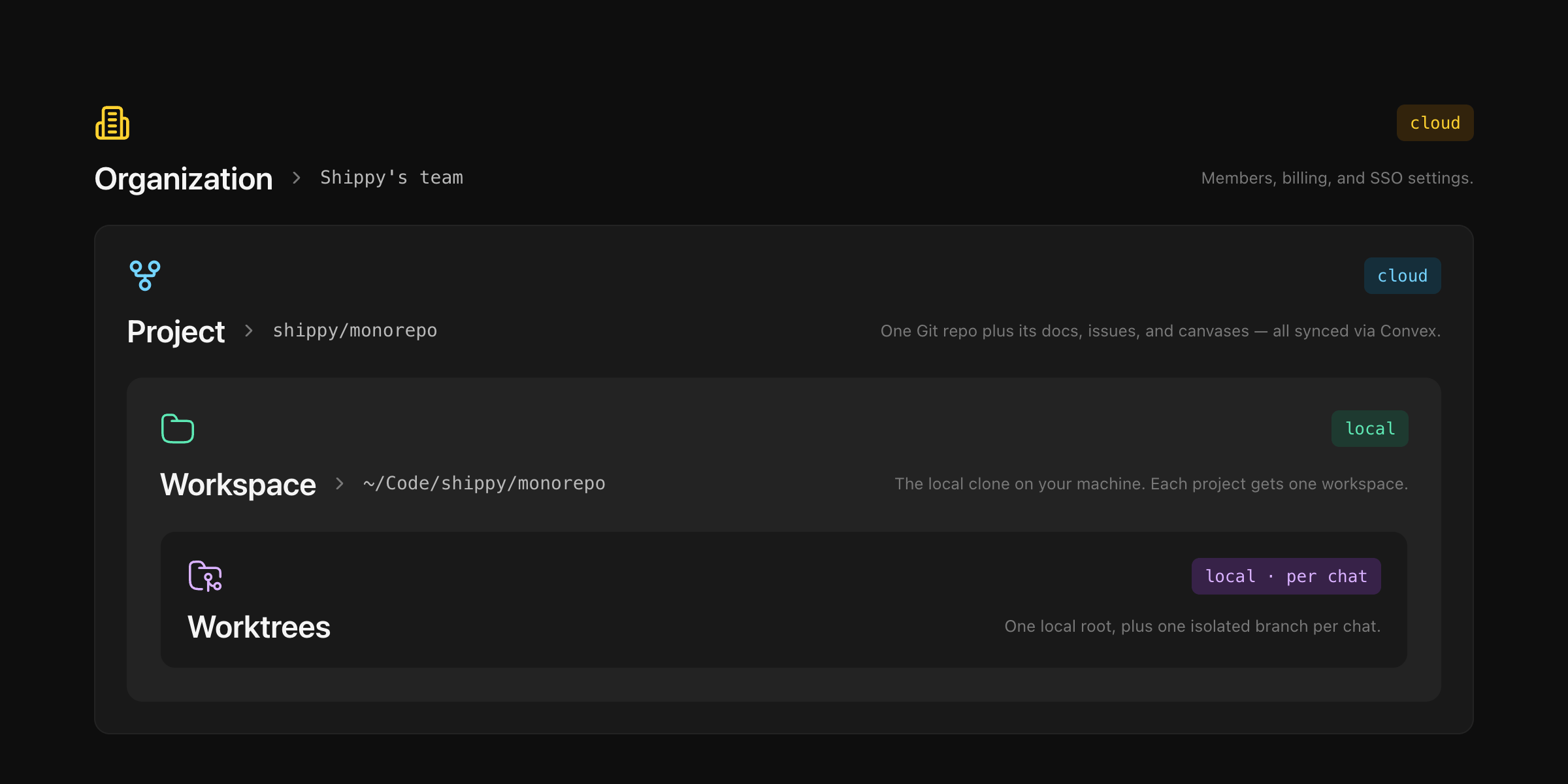
* **Organization** — who can see what.
* **Project** — a repository registered to an org.
* **Workspace** — the project's folder on your machine.
* **Worktree** — an isolated branch where an AI chat runs.
 ## Organizations
The top-level container. Holds teams, projects, and all cloud data (docs, issues, canvases, chat history). Switching orgs changes what you see but moves nothing.
| | Private | Team |
| ------------------- | ------------------ | -------------------------- |
| One per account | Yes (auto-created) | Create as many as you like |
| Visible to others | No | Yes |
| Local-only projects | Allowed | Remote URL required |
| Can be deleted | No | Yes (admin) |
**Roles** — Admin (rename, set logo, invite + remove members, delete the org) or Member (see and edit everything, can invite others, can't remove members).
**Invite teammates** — Settings → Members → enter emails. Invitees get a link and appear as active once they sign in.
## Projects
A repository registered to an organization. One project = one repo. Docs, issues, and canvases attach to the project and travel with it.
In a team org, projects must be a remote URL (GitHub, GitLab) and can't be registered twice. Private orgs also allow local-only projects (folders with no remote).
## Workspaces
A project's folder on your machine. It holds:
* **One local root** — your persistent checkout. Switch branches, run your dev server, push commits.
* **Zero or more worktrees** — short-lived sibling checkouts spawned by AI chat sessions.
Each workspace keeps its own canvas, chat history, dev-server config, and view modes. State is preserved per workspace.
Working across frontend + backend + shared libs at once? Multi-repo is supported via git submodules — see [Multi-Repo Workspaces](/guides/multi-repo).
## Worktrees
Every AI chat runs in its own git worktree on a throwaway branch — `{your-git-username}/{workspace-slug}` — created lazily on the agent's first edit. The main branch stays untouched.
| | Local root | Ephemeral worktree |
| ------------------- | ---------- | ------------------ |
| Count per workspace | One | One per AI chat |
| Lifetime | Permanent | Ends with the chat |
| Branch | You choose | Auto-generated |
| Who edits it | You | The agent |
## Organizations
The top-level container. Holds teams, projects, and all cloud data (docs, issues, canvases, chat history). Switching orgs changes what you see but moves nothing.
| | Private | Team |
| ------------------- | ------------------ | -------------------------- |
| One per account | Yes (auto-created) | Create as many as you like |
| Visible to others | No | Yes |
| Local-only projects | Allowed | Remote URL required |
| Can be deleted | No | Yes (admin) |
**Roles** — Admin (rename, set logo, invite + remove members, delete the org) or Member (see and edit everything, can invite others, can't remove members).
**Invite teammates** — Settings → Members → enter emails. Invitees get a link and appear as active once they sign in.
## Projects
A repository registered to an organization. One project = one repo. Docs, issues, and canvases attach to the project and travel with it.
In a team org, projects must be a remote URL (GitHub, GitLab) and can't be registered twice. Private orgs also allow local-only projects (folders with no remote).
## Workspaces
A project's folder on your machine. It holds:
* **One local root** — your persistent checkout. Switch branches, run your dev server, push commits.
* **Zero or more worktrees** — short-lived sibling checkouts spawned by AI chat sessions.
Each workspace keeps its own canvas, chat history, dev-server config, and view modes. State is preserved per workspace.
Working across frontend + backend + shared libs at once? Multi-repo is supported via git submodules — see [Multi-Repo Workspaces](/guides/multi-repo).
## Worktrees
Every AI chat runs in its own git worktree on a throwaway branch — `{your-git-username}/{workspace-slug}` — created lazily on the agent's first edit. The main branch stays untouched.
| | Local root | Ephemeral worktree |
| ------------------- | ---------- | ------------------ |
| Count per workspace | One | One per AI chat |
| Lifetime | Permanent | Ends with the chat |
| Branch | You choose | Auto-generated |
| Who edits it | You | The agent |
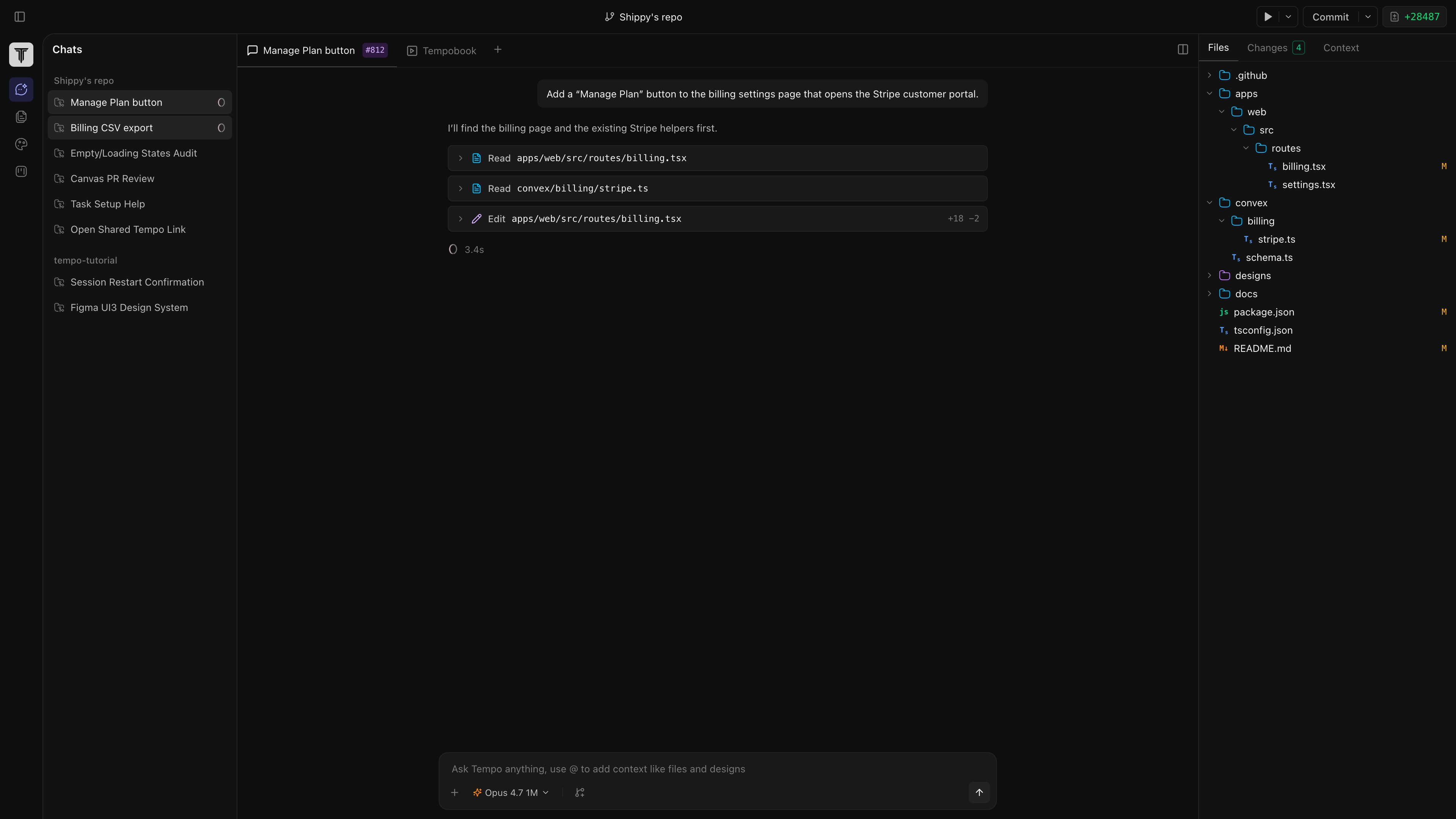 **Merge back** — review the diff in the **Changes** panel, commit and push from inside the chat (the agent runs `git push`), then open a PR on your git host.
**Discard** — end the chat or click **Discard**. Tempo runs `git worktree remove` and deletes the branch. Your local root is untouched.
**Merge back** — review the diff in the **Changes** panel, commit and push from inside the chat (the agent runs `git push`), then open a PR on your git host.
**Discard** — end the chat or click **Discard**. Tempo runs `git worktree remove` and deletes the branch. Your local root is untouched.